
Home › Solutions › AI Factory Protection
CloudCasa protects the AI workloads in your AI factory: the vector databases, model files, application state and Kubernetes configuration behind RAG and inference services. Certified for SUSE AI Factory with NVIDIA, validated with NVIDIA AI blueprints, and available self-hosted for sovereign and air-gapped AI.
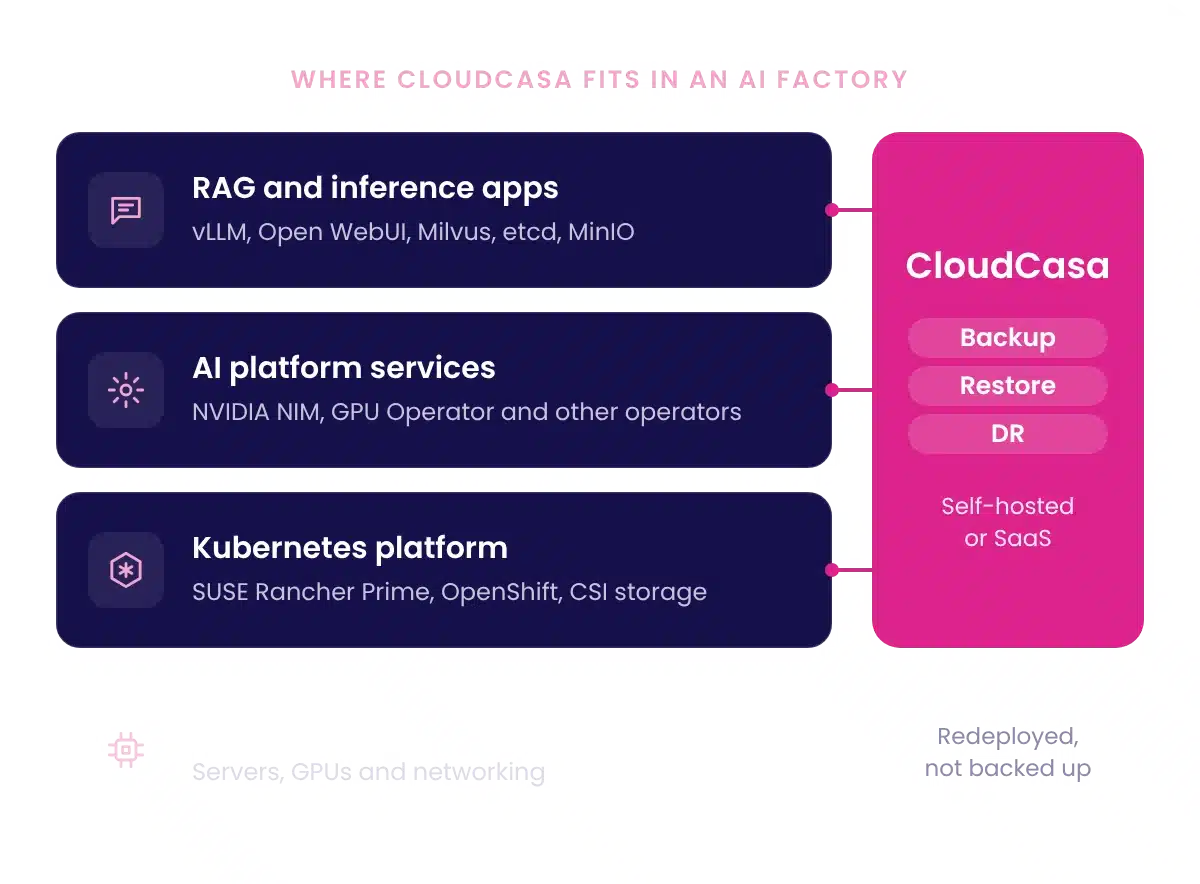
Why AI workloads need backup
Container images and Helm charts come back from a registry. The data a RAG service builds while it runs does not: document embeddings, vector indexes, uploaded files, chat history, user accounts and the settings of the serving stack. Once a pipeline connects a model to your organization's documents, that state is part of the service you operate.
Restoring a vector index is a data copy. Rebuilding it means re-ingesting and re-embedding the corpus on GPU capacity, and that cost grows with the size of the data.
vLLM and NVIDIA NIM serving configuration, plus model weights, adapters and fine-tuned checkpoints kept on persistent volumes.
Milvus collections and indexes, the etcd metadata that locates them, and the MinIO objects underneath.
Chat history, notes, accounts and settings in front ends such as Open WebUI, and the databases and identity services they depend on.
Namespaces, Deployments, Services, ConfigMaps, Secrets, PVCs and the custom resources that NVIDIA and SUSE operators manage.
How it works
CloudCasa works at the Kubernetes platform layer, under the AI platform. It protects what a blueprint deploys without changes to the blueprint, using the same backup policies, storage targets and runbooks as your other stateful workloads.
Step 1
List the namespaces, persistent volumes and custom resources the AI application uses, and anything it reaches outside the cluster. Blueprints often span several namespaces and rely on cluster-scoped operators, so check the inventory against the running deployment, not only the chart.
Step 2
On SUSE Rancher Prime, install the CloudCasa extension and deploy the agent from the Rancher UI. On other distributions, install the agent with Helm or kubectl. Connect it to CloudCasa self-hosted or CloudCasa SaaS.
Step 3
Select the AI namespaces by name or label and include persistent volumes. CloudCasa takes CSI snapshots and copies the data to backup storage on the schedule and retention you set. Application hooks run commands before and after a backup for consistent capture of the vector database and its metadata store. Configure and test them for your database versions.
Step 4
Send copies to S3-compatible storage outside the failure domain of the production cluster. Object Lock keeps restore points immutable for the retention period, and SafeLock protects the recovery point catalog in CloudCasa.
Step 5
Restore namespaces, resources and volumes to the same cluster or to another cluster, with namespace and storage class mapping. Then test the application, not only the job: sign in, check restored chats, run retrieval against known documents and confirm inference.
Every backup and restore job leaves a timestamped record in CloudCasa. Kept with your runbook, those records show auditors what was protected and when recovery was last proven. Read the RAG protection walkthrough →
Recovery paths
CloudCasa protects an AI application's Kubernetes resources and persistent volumes together. Backups go to off-cluster storage and restore to the same or a second cluster. CloudCasa DR is a separate path built on storage replication. Many teams use both: replication for site outages, and retained backups to return to an earlier state.


Backup-based recovery
CloudCasa reads the recovery point from backup storage and writes it to new volumes on the target cluster. No storage replication is involved, so the source and target can run different storage. Recovery time depends on data volume, network throughput and application start-up.
Storage-integrated DR
CloudCasa DR orchestrates failover and failback on top of replication done by the storage layer, such as SUSE Storage (Longhorn) disaster recovery volumes. The Kubernetes resource definitions travel with the replicated volumes, so the standby cluster recovers without reading a separate backup.
Model serving pods need GPUs and the NVIDIA runtime on the target cluster. Without them, the rest of the application starts and inference waits for capacity. Install cluster-scoped prerequisites, such as the NVIDIA GPU Operator and NIM Operator, on recovery clusters before you need them.
Certification and validation
CloudCasa by Catalogic holds the Certified for SUSE AI Factory with NVIDIA certification, the tier of SUSE's ISV program for jointly validated configurations. Catalogic also tests AI blueprints itself, and publishes where each kind of support applies.
Certified
Validated jointly with SUSE. CloudCasa installs and runs from SUSE Rancher Prime alongside the SUSE AI Factory extension, and protects applications deployed from its blueprints.
Validated by Catalogic
Backup, in-place restore, restore to a second cluster, and DR failover and failback, tested with two blueprints: the NVIDIA RAG blueprint (low-GPU profile) and the SUSE AI chatbot with RAG (vLLM, Open WebUI, Milvus).
Supported platforms
Red Hat OpenShift, SUSE Rancher Prime and RKE2, Nutanix Kubernetes Platform, Mirantis Kubernetes Engine, Amazon EKS, Azure AKS, Google GKE and other conformant distributions with CSI storage. CloudCasa protects AI workloads on them at the Kubernetes layer. AI blueprint validation so far covers SUSE AI Factory.
Sovereign AI
CloudCasa self-hosted runs the control plane and backup catalog on clusters you manage, including fully air-gapped sites. Agents write backup data directly to S3-compatible storage you own, in the jurisdiction you choose, with no dependency on a SaaS service. Platform teams manage it from the Rancher Prime UI through the CloudCasa extension, or from the CloudCasa console.
An AI factory runs inference, RAG and agent services as Kubernetes workloads. Backup has to capture the namespaces, custom resources and persistent volumes those services create, keep copies outside the cluster, and restore them to the same or a different cluster. CloudCasa does this at the Kubernetes layer, so it applies to whichever AI platform runs above it.
It depends where they come from. Weights pulled from a registry can be pulled again, although an air-gapped site may not have that option. Fine-tuned checkpoints, adapters and locally modified models usually exist nowhere else and belong in the backup. Stateless inference endpoints that you redeploy from Git need less protection.
CloudCasa takes CSI snapshots of the volumes and can run application hooks before and after the snapshot, for example to flush or pause writes. Configure hooks for the vector database and its metadata store, then confirm consistency with a restore test.
NVIDIA blueprints deploy as Kubernetes namespaces, operators, custom resources and persistent volumes, which CloudCasa protects on any supported distribution. Catalogic has validated blueprint protection on SUSE AI Factory with NVIDIA. On other platforms, include a restore test in your evaluation.
Yes. CloudCasa self-hosted runs without a connection to CloudCasa SaaS. Plan for local container images, a process for updates, and access to backup storage from the recovery environment.
Yes. Cross-cluster migration, from one Kubernetes cluster to another, restores an AI application on a different cluster, including across storage classes. Teams use it for hardware refresh, Kubernetes upgrades, and moves between edge, core and cloud clusters.

Blog · SUSE
Backup, recovery and DR for RAG and inference workloads, step by step.
Read More →
Datasheet · SUSE
Backup, recovery and workload mobility for AI workloads on SUSE Rancher Prime.
Read More →
Solution · DR
Fail Kubernetes workloads and VMs over to a standby cluster using the replication your storage array already runs.
Read More →