
Together, CloudCasa by Catalogic and Dell PowerStore provide a complete disaster recovery solution for Kubernetes environments — combining PowerStore’s native array-to-array replication with CloudCasa’s Kubernetes-aware orchestration. PowerStore handles the data path, synchronously or asynchronously, while CloudCasa discovers workloads, validates the DR plan, and rebuilds Deployments, StatefulSets, and KubeVirt VMs on the target cluster, reconnecting them to the recovered volumes. The result is a coordinated recovery process designed to move applications from failover to restored service in minutes rather than hours.
In this post
- The gap we are closing
- What CloudCasa is
- How the integration works
- How a failover works
- How failback works
- Why this matters for Dell customers
- Where it runs
- Why CloudCasa
- Is this the right fit?
- Frequently asked questions
- Plans and licensing
- Getting started
The gap we are closing
Dell PowerStore customers are running more of their production estate on Kubernetes: Red Hat OpenShift, SUSE Rancher/RKE2, VMware vSphere Kubernetes Service, and upstream distributions, often with virtual machines migrated onto KubeVirt, OpenShift Virtualization, or SUSE Virtualization alongside the containers. Many have already put a backup tool in place. Far fewer have solved disaster recovery: a way to fail these environments over to a second site in minutes, not hours.
CloudCasa closes that gap with storage-integrated disaster recovery: PowerStore’s enterprise-grade replication engine performs the storage replication, and CloudCasa orchestrates the Kubernetes side of the failover, from discovery and validation through rebuilding the affected workloads on the target cluster. Data stays on PowerStore – secure, on-array, and never rerouted. CloudCasa protects the Kubernetes applications running on top of it and is designed to help customers achieve recovery objectives measured in minutes: RTO (recovery time objective) in minutes, and can support near-zero RPO when paired with PowerStore’s synchronous replication. No new storage-replication layer gets bolted on to get there. Actual results depend on replication mode, workload size, network distance, cluster readiness, and application dependencies.
What CloudCasa is
CloudCasa by Catalogic is a data protection platform built specifically for Kubernetes: backup and restore, disaster recovery, migration, and protection for Kubernetes-native virtual machines. One platform covers all four, designed around Kubernetes resources and persistent-volume data from the ground up rather than adapted from a VM-first backup product.
The backup and restore side of the platform, including scheduling, retention, and granular recovery, is covered in more depth on the Kubernetes backup and restore page.
How the DR integration works
The design choice that shapes everything else: PowerStore’s proven replication engine moves the data, and CloudCasa orchestrates the Kubernetes side of the recovery. Persistent-volume data moves array-to-array over PowerStore’s high-performance synchronous or asynchronous replication. It never routes through CloudCasa.
What CloudCasa does instead is track state. It continually records the configuration of every protected workload into a replicated inventory volume, using the PowerStore REST API to talk to the array directly. When a failover is triggered, CloudCasa uses that inventory to rebuild the Kubernetes resources, the persistent-volume claims, and any KubeVirt virtual machines on the target cluster, pointing them at the volumes PowerStore has already replicated.
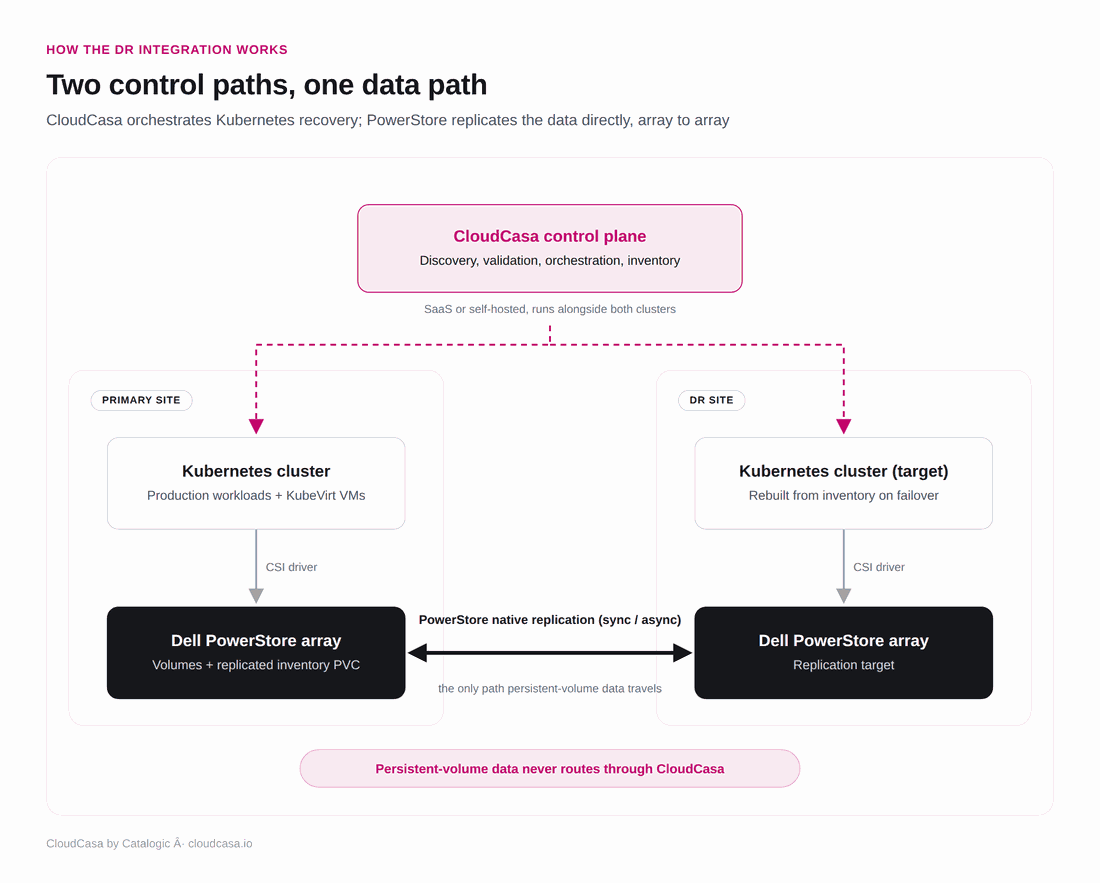
CloudCasa’s control plane and PowerStore’s replication path stay separate: one moves configuration, the other moves data.
See CloudCasa DR for Storage to learn more details, or talk to the team if you want to walk through your own PowerStore environment.
How a failover works
CloudCasa starts by validating the DR plan itself: the target cluster, the array, and the replicated inventory volume all have to check out before anything moves. From there, the sequence runs in three phases.
CloudCasa first fails over the inventory volume, imports it into the target cluster, and starts a recovery agent using that inventory. With the inventory in place, it switches over the remaining workloads at the volume-group level and restores the Deployments, StatefulSets, and virtual machines the plan covers. The last step binds each workload’s PVCs to the volumes PowerStore has already recovered.
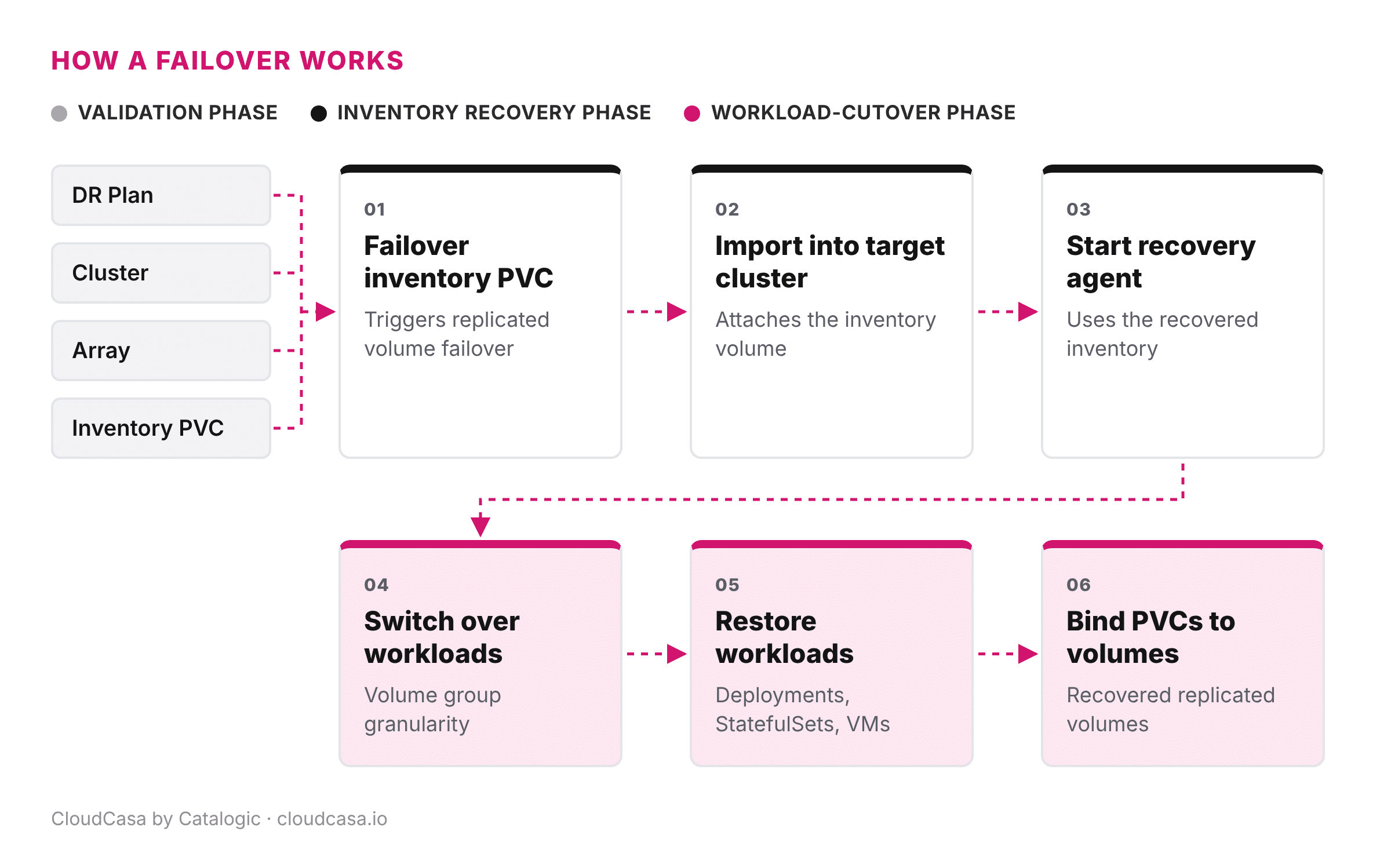
Failover operates on complete volume groups, so workloads with different recovery requirements need to sit in separate groups. Self-hosted deployments can run the CloudCasa server at both sites, so the DR control path itself has no single point of failure.
How failback works
Failback requires operator confirmation by design. Once the primary site is back online, CloudCasa invokes a reprotect that reverses the replication direction on the affected volume groups. PowerStore then resynchronizes only the delta accumulated since the failover, not a full copy.
Once that reverse-replication session reports synchronized, CloudCasa runs the planned failback: the workloads still running at the DR site scale down first, and the volume groups then fail back to the primary array.
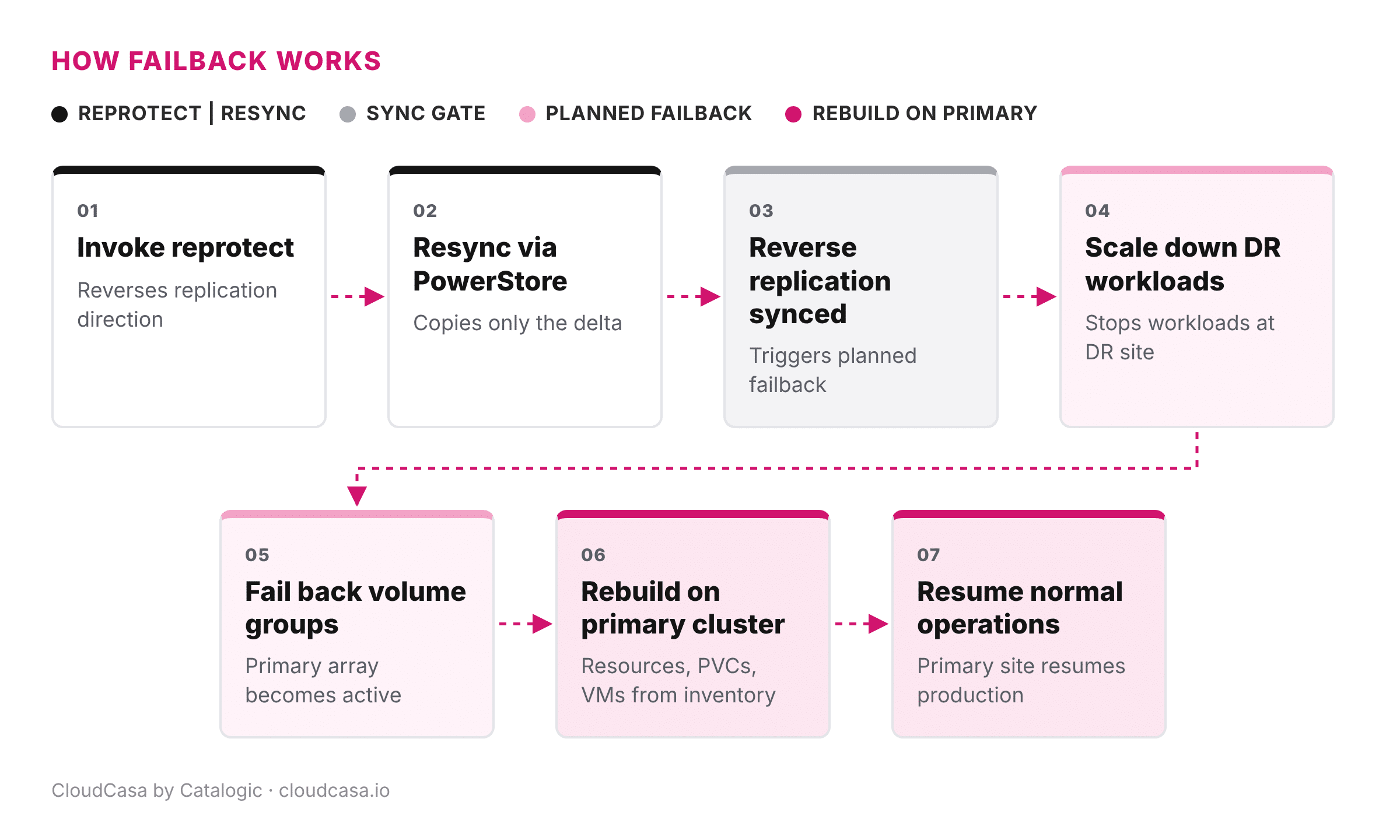
CloudCasa rebuilds the Kubernetes resources, the PVCs, and the virtual machines on the primary cluster from the current inventory, and normal operations resume there. An operator confirms the failback step; production does not bounce back to the primary site on its own.
Why this matters for Dell customers
Failover runs on PowerStore’s native replication – no third-party replication layer, no added latency – so RTO is designed to support recovery in minutes instead of the hours a manual Kubernetes-side rebuild typically takes once the array has already failed over, with RPO near-zero when the underlying replication is synchronous. The persistent-volume data itself never leaves Dell’s trusted infrastructure: it moves array-to-array, driven by an in-cluster agent that talks to PowerStore directly whether CloudCasa runs as SaaS or self-hosted.
Recovery covers more than volumes. CloudCasa rebuilds the Kubernetes resources and KubeVirt VMs that make the underlying data usable again, and it does so from the same console that already handles scheduled backup, granular restore, and migration. DR is managed through the same CloudCasa console.
| Dimension | Storage replication alone | CloudCasa DR for PowerStore |
|---|---|---|
| Recovery time | Array is back; someone still has to rebuild the Kubernetes side by hand | Minutes, workloads rebuilt automatically from inventory |
| Data path | Array-to-array replication only | Same array-to-array replication, unchanged |
| What comes back | Raw volumes | Deployments, StatefulSets, PVCs, and KubeVirt VMs, bound and running |
| Failback | Manual resync and cutover | Operator-confirmed, delta-only resync via reprotect |
Where it runs
CloudCasa DR for Dell PowerStore targets CNCF-certified Kubernetes distributions and their virtualization layers: Red Hat OpenShift and OpenShift Virtualization, SUSE Rancher/RKE2 and SUSE Virtualization, VMware vSphere Kubernetes Service, and upstream Kubernetes 1.20 and later. PowerStore is the first Dell array this integration covers. For backup, CloudCasa already protects Kubernetes workloads on other Dell storage, including Data Domain, ECS, and PowerScale, from the same console. Backup and DR are licensed separately, but both run in one CloudCasa product. CloudCasa uses the PowerStore CSI driver (csi-powerstore) for volume provisioning, and the PowerStore REST API to orchestrate DR failover and failback directly. It does not depend on CSM functionality for DR failover or failback.
Why CloudCasa
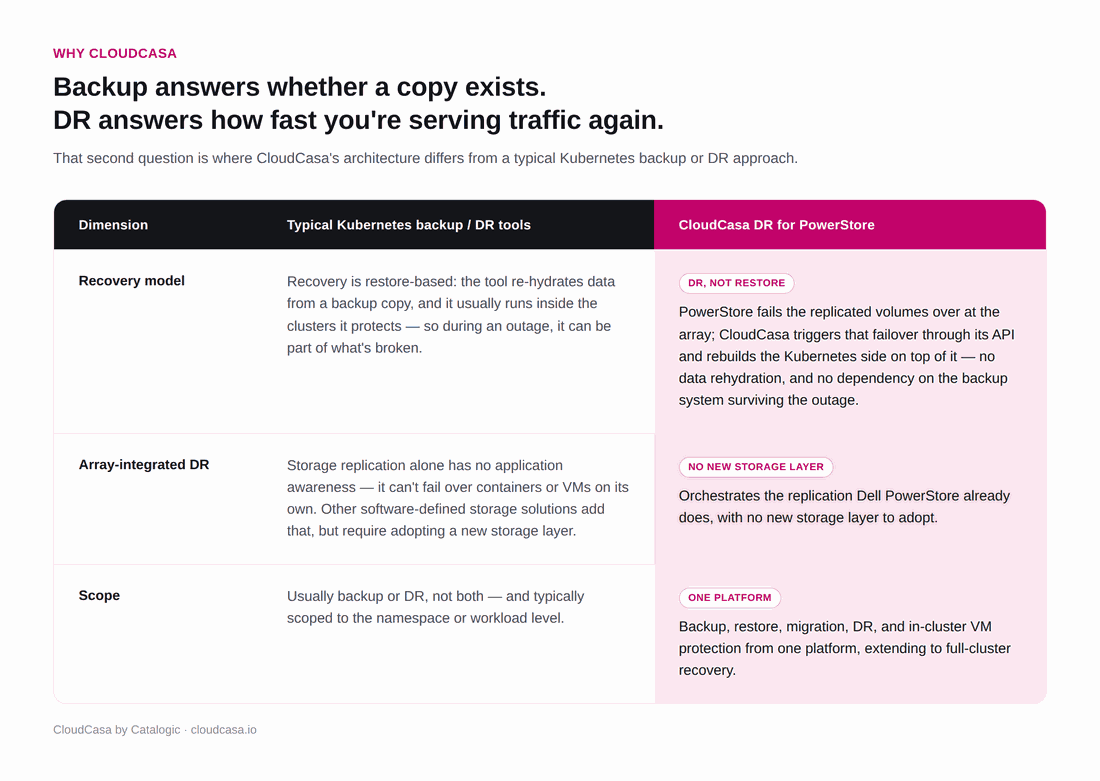
Backup answers one question: is there a copy of the data? Kubernetes disaster recovery answers a harder one: how fast is the application serving traffic again, and how much was lost getting there? That second question is where CloudCasa’s architecture differs from a typical Kubernetes backup tool.
Is this the right fit?
This is worth a look if any of these sound familiar:
- Production workloads run on Kubernetes backed by Dell PowerStore, and backup already exists but a tested failover to a second site does not.
- Recovery time is a specific number written into a contract or a regulation, and a manual rebuild that takes hours after a failure blows past it.
- Containers and KubeVirt VMs run side by side, and recovery has to rebuild the workloads themselves, along with the volumes underneath them.
- Your team runs backup and DR as two separate tools today, and one console would be simpler.
One scope note: today’s integration covers block-based (SCSI) persistent volumes on PowerStore. File-based (NFS/SMB) volume DR is on CloudCasa roadmap, not yet covered.
Frequently asked questions
Does persistent-volume data ever pass through CloudCasa?
No. PowerStore replicates volume data directly and securely, array-to-array – keeping your data entirely within Dell’s infrastructure. CloudCasa’s in-cluster agent talks to the PowerStore API to orchestrate discovery, validation, failover, and failback, but the data path stays entirely on PowerStore.
How fast is a failover?
Because failover runs on PowerStore’s native, high-performance replication, RTO is designed to support recovery in minutes rather than the hours typical of manual, storage-replication-only recovery, and RPO approaches zero when PowerStore is configured for synchronous replication.
Is failback automatic?
No. Failback is operator-confirmed by design: CloudCasa resynchronizes the delta and waits for confirmation before cutting production back to the primary site.
What Kubernetes platforms does this cover?
CNCF-certified Kubernetes distributions and their virtualization layers, including Red Hat OpenShift, SUSE Rancher/RKE2, VMware vSphere Kubernetes Service, and upstream Kubernetes 1.20 and later.
Does this replace PowerStore’s own replication?
No, and that’s the point. PowerStore’s enterprise replication remains the foundation, handling all data movement array-to-array. CloudCasa orchestrates the Kubernetes-side work around it: tracking workload state, triggering failover and failback, and rebuilding resources on the target cluster – so PowerStore’s replication strengths are fully preserved and extended to cover the entire application stack.
Plans and licensing
CloudCasa ships as CloudCasa Pro (SaaS) or CloudCasa Enterprise (self-hosted), both licensed per worker node on an annual subscription. Backup & Restore and CloudCasa DR are each licensed per worker node and can be purchased independently of each other.
| Item | Detail |
|---|---|
| License metric & Plans | CloudCasa is available as SaaS or Self-Hosted, both licensed per worker node on an annual subscription. |
| Backup & Restore | Licensed per worker node on both SaaS and Self-Hosted; can be licensed independently of CloudCasa DR. |
| CloudCasa DR | Licensed per worker node on both SaaS and Self-Hosted; can be licensed independently of Backup & Restore. |
Getting started
None of this requires ripping out your existing PowerStore deployment. PowerStore keeps doing what it does; CloudCasa sits alongside it and handles the Kubernetes side of a failover you would otherwise be doing by hand.
If you are running Kubernetes on Dell PowerStore and want to see Dell PowerStore disaster recovery against your own environment, contact casa@cloudcasa.io. If you would rather start with Kubernetes backup and restore and evaluate DR later, a 60-day free trial covers up to five worker nodes at signup.cloudcasa.io. Full plan details and pricing are online either way.
Related reading
- How to Set Up Backup and Recovery on Your Own Kubernetes Cluster in 5 Minutes
- NIS2 and DORA Compliance for Kubernetes Backup
Related resources
