Kubernetes backup sounds straightforward until you look closely at what a real application includes. A production workload usually spans Kubernetes resources, cluster configuration, persistent volumes, secrets, service accounts, network policies, and external dependencies such as cloud databases or object storage. Protecting one of those layers helps. Protecting all of them in a coordinated way is what makes recovery practical.
This article is for DevOps engineers, SREs, platform teams, and infrastructure leads who run Kubernetes in real environments and need a backup strategy that holds up during an outage, migration, ransomware event, cluster failure, or operator mistake. If you own recovery time objectives, recovery point objectives, compliance requirements, or day-two reliability, this is worth your time.
By the end, you’ll have a clear model for how Kubernetes backup works, what needs protection, where etcd fits, how PVCs and CSI snapshots affect recoverability, and what features matter when choosing a backup solution. You’ll also see why CloudCasa is a strong fit for production Kubernetes environments.


Why Kubernetes backup needs its own strategy
Kubernetes changes the shape of infrastructure operations. Applications are assembled from declarative resources and scheduled dynamically across nodes. Storage is abstracted through persistent volumes and claims. Controllers create and reconcile resources continuously. Operators extend the API surface. Managed services push part of the stack outside the cluster boundary. That architecture brings flexibility, though it also changes what “backup” means. In a Kubernetes environment, there is no single artifact that captures the full state of an application in a form that is always ready for recovery. A control plane snapshot helps recover cluster metadata and API objects. A volume snapshot helps recover persistent data. A namespace export captures part of the desired state. A database dump protects a specific data service. Real protection comes from understanding how these pieces fit together. That is why a Kubernetes backup plan should answer a few practical questions:- Can I recover cluster resources and configuration?
- Can I recover persistent application data from PVCs?
- Can I restore to the same cluster and to a different cluster?
- Can I recover an individual namespace or resource without restoring everything?
- Can I survive storage failure, cluster deletion, region disruption, or ransomware?
- Can I do all of that with a repeatable, tested process?
What you need to protect in Kubernetes
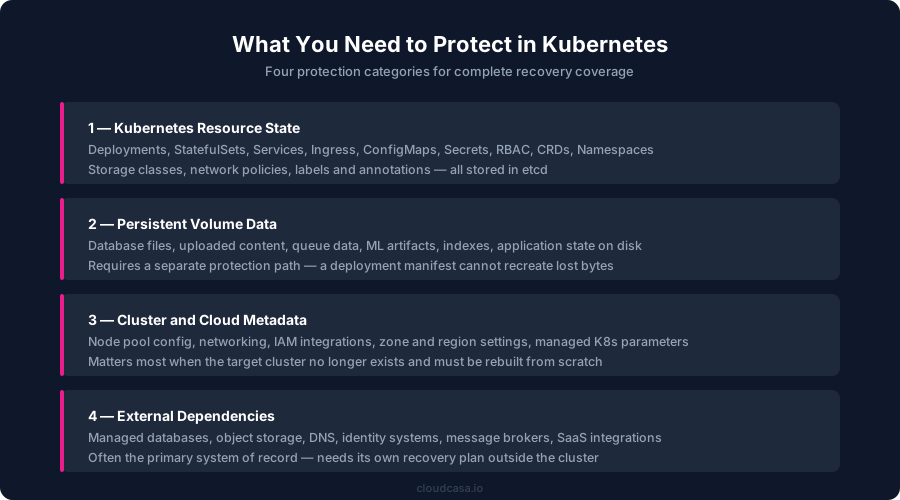
A reliable backup design starts with the right inventory. In Kubernetes, four major categories matter.1. Kubernetes resource state
This includes the Kubernetes objects that define and control the application and the cluster environment. Examples include:- Deployments
- StatefulSets
- DaemonSets
- Services
- Ingress resources
- ConfigMaps
- Secrets
- Service accounts
- Roles and role bindings
- Custom resource definitions and custom resources
- Storage classes
- Volume snapshot classes
- Namespace configuration
- Policies and labels
2. Persistent volume data
For stateful applications, the business value usually sits in the PVC-backed data. This includes database files, uploaded content, repositories, indexes, logs, queue data, machine learning artifacts, and internal application state. A deployment manifest can recreate a pod. It cannot recreate the bytes inside a missing volume. That data needs its own protection path.3. Cluster and cloud metadata
In self-managed environments, control plane recovery details matter. In managed Kubernetes environments such as EKS, AKS, and GKE, cloud-level settings also matter. Those settings can include networking configuration, node pool details, region and zone settings, IAM-related integrations, and cluster service parameters that are useful during a rebuild. This matters in disaster recovery scenarios where the target cluster no longer exists and the recovery plan includes creating or recreating the cluster.4. External dependencies
A Kubernetes application often depends on components outside the cluster boundary, including:- Managed databases such as Amazon RDS
- Object storage buckets
- DNS records
- Identity systems
- External message brokers
- SaaS integrations
- Certificate services
The role of etcd in Kubernetes backup
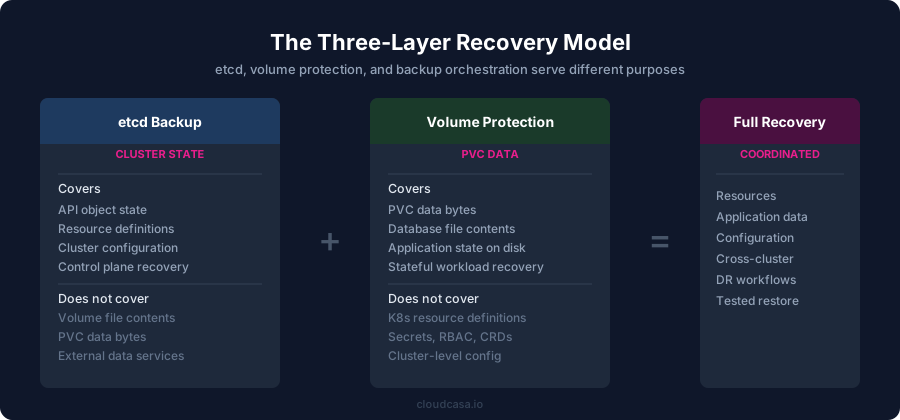
etcd is the key-value store used by Kubernetes to hold cluster state. It stores the objects that represent the current state of the Kubernetes API. That makes etcd central to disaster recovery for the control plane. For self-managed clusters, periodic etcd backup is a core best practice. An etcd snapshot can help restore cluster state after control-plane corruption, deletion, or severe misconfiguration. It is especially useful when you need to recover the cluster’s own API objects as they existed at a known point in time. That said, etcd is only one layer of protection. An etcd snapshot does not protect the file contents of a database volume attached to a StatefulSet. It does not capture the bytes stored in a PVC. It does not automatically protect cloud databases that live outside the cluster. It gives you Kubernetes state, resource definitions, and metadata. That is valuable, though it is not the whole recovery picture. A sound mental model is simple:- etcd protects Kubernetes object state
- volume protection protects persistent application data
- backup orchestration ties them together into a recoverable application
PVCs, PVs, and why volume data needs separate protection
Persistent volumes and persistent volume claims are how Kubernetes manages durable storage for workloads. The claim defines what the workload requests. The volume represents the underlying storage resource. The storage class and CSI driver determine how that storage is provisioned and managed. For backup planning, this means the application data lifecycle is separate from the pod lifecycle. Pods can be rescheduled. Nodes can change. The PVC remains the anchor for stateful data consumption. That design is useful operationally and important for recovery planning. When a workload depends on a PVC, backup needs to cover:- the Kubernetes resources that define the workload
- the PVC object itself
- the underlying persistent volume data
- any consistency steps needed before capture
Where CSI snapshots fit
Container Storage Interface, or CSI, is the standard Kubernetes uses to interact with storage systems. CSI snapshots provide a point in time snapshot mechanism for supported CSI volumes through Kubernetes APIs. This is an important piece of the backup stack because snapshots are fast, storage-aware, and useful for recovery workflows. They work well for many production scenarios, especially when the CSI driver supports them cleanly and the storage platform is stable. CSI snapshots help with:- point in time capture of volume state
- fast local recovery workflows
- efficient backup pipelines that use the snapshot as a read source
- storage-aware recovery for supported drivers
- snapshot CRDs must be installed
- the snapshot controller must be present
- the CSI driver must support snapshots
- the storage platform must implement the feature correctly
What CSI snapshots do well, and what they do not replace
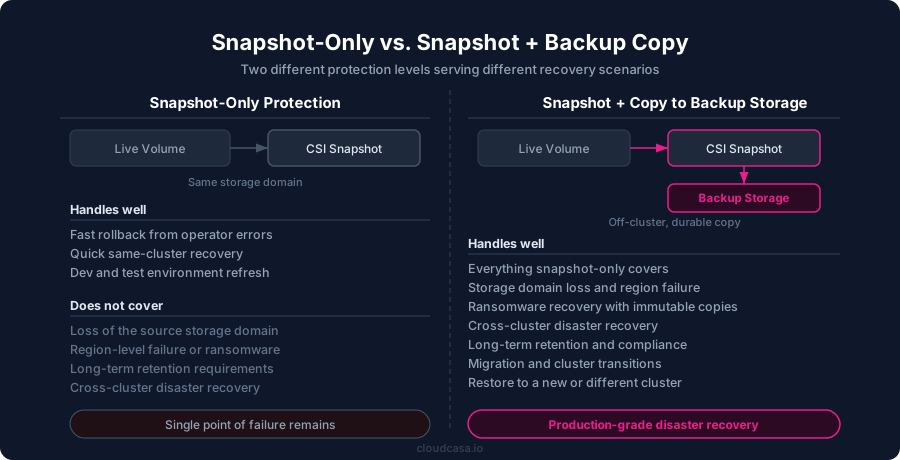
CSI snapshots are extremely useful, though they should be placed in context. A snapshot is a point in time recovery primitive. It helps you roll back or read from a consistent storage state. It improves the efficiency of backup operations because the backup tool can read from the snapshot instead of the live mounted volume. It can also shorten restore operations inside the same storage environment. What it does not guarantee on its own is off-cluster durability. A local volume snapshot stored within the same storage domain helps with quick operational recovery. It does not automatically give you a separate backup copy that survives loss of the source storage system, a broader infrastructure event, or a malicious deletion scenario. That is why mature Kubernetes backup platforms distinguish between:- snapshot-only protection
- snapshot plus copy to backup storage
Backup consistency for stateful workloads
Stateful workloads need more than “something got copied.” They need a recovery point that makes sense for the application. Many systems can tolerate crash-consistent snapshots. Some databases and transactional services need more controlled handling so data is flushed, paused, frozen, or otherwise prepared before backup begins. Without that step, recovery can still succeed, though the restore quality may depend heavily on the application’s own integrity and journal replay behavior. In Kubernetes backup, consistency is often improved with application hooks. These hooks let the backup platform run commands before backup, after backup, and after restore. For example, a pre-backup hook can flush an application state or trigger database-specific coordination. A post-restore hook can perform bootstrap or validation steps after recovery. For virtualized workloads running through KubeVirt or related platforms, consistency can also be improved through guest agent integration, including freeze and unfreeze operations for VM filesystems. This is a major buying criterion for backup products. A checkbox for “supports backups” tells you very little. Hook support, application awareness, and testable restore workflows tell you much more.The core Kubernetes backup strategies
There are several valid ways to protect Kubernetes. The right one depends on workload type, data criticality, recovery targets, and infrastructure design.Resource backup only
This strategy captures Kubernetes resources and configuration, often including cluster-scoped objects. It is useful for:- stateless workloads
- GitOps-driven environments
- reference recovery of YAML and cluster state
- policy and compliance capture
etcd backup plus resource protection
This adds control-plane recovery for self-managed clusters and gives stronger cluster-state recovery coverage. It is useful when recovering the cluster itself is part of the DR plan. It still needs separate PVC protection for stateful workloads.Snapshot-oriented volume protection
This strategy uses CSI snapshots or other storage-level snapshot methods to protect persistent volumes. It supports fast recovery and efficient backup orchestration. It works well when the storage stack is snapshot-capable and well-integrated. Teams should still evaluate whether they also need backup copies outside the source storage environment.Snapshot plus copy to backup storage
This is one of the strongest general-purpose strategies for production Kubernetes. The snapshot provides a stable source and fast local recovery option. The backup copy provides durable retention and better survival against storage failure or broader infrastructure incidents. This model supports many real-world objectives:- operational restores
- ransomware recovery
- disaster recovery
- retention policies
- cross-cluster restores
- migration projects
Replication and disaster recovery workflows
Some environments need low-RTO recovery paths that combine backup with storage replication and cross-cluster failover. In these designs, the backup system restores Kubernetes resources while storage replication provides the volume-level data path. This is useful for organizations with stricter service continuity requirements and storage platforms that expose remote replication capabilities.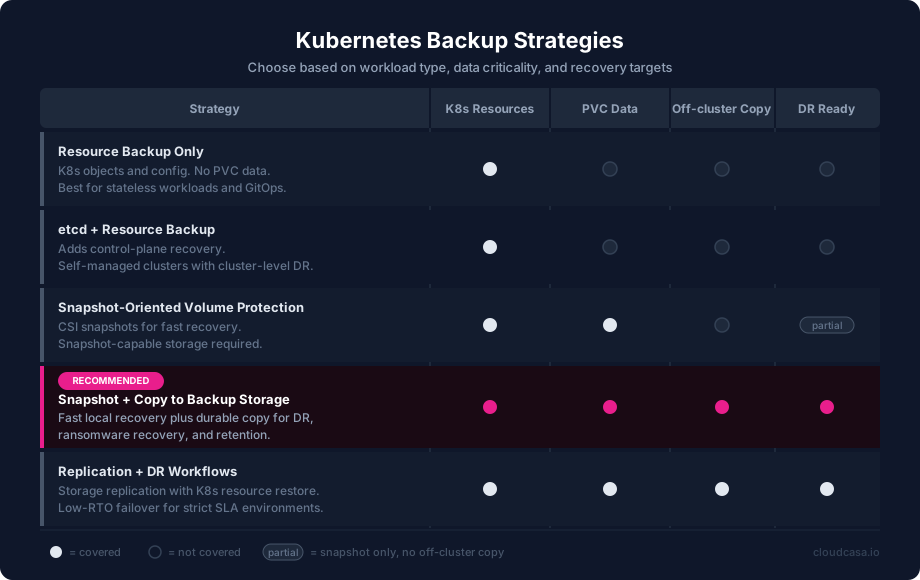
How to evaluate a Kubernetes backup solution
A serious backup product for Kubernetes should support the operational shape of production clusters. That means more than capturing YAML and taking snapshots. Here’s what to look for.Coverage of both resources and data
The platform should protect Kubernetes objects and PVC data in one coordinated workflow. If the product only handles resources or only handles data, you inherit more manual recovery work.Granular restore options
Recovery should support multiple scopes, including:- full cluster restore
- namespace restore
- individual resource restore
- volume restore
- file-level recovery when applicable
Cross-cluster recovery
A good product should restore to a different cluster, including migration and DR use cases. This is crucial when the source cluster is unavailable or when workloads need to be moved during upgrades, consolidation, or platform transitions.CSI and storage awareness
The platform should support CSI snapshot workflows, understand the difference between snapshot and backup copy, and document supported PV types clearly. Storage behavior is too important for hand-wavy language.Application consistency support
Look for application hooks, database-aware workflows, and VM guest coordination where relevant. Restore quality matters as much as backup completion.Policy and automation
Backup should be schedulable, policy-driven, and manageable through API or infrastructure-as-code workflows. DevOps teams need repeatable operations, not purely manual console steps.Security and compliance features
Important features include immutable backups, RBAC, encryption support, access controls, and deployment models that fit regulated or sovereign environments.Deployment flexibility
Some organizations want SaaS management. Some need self-hosted control. Some need air-gapped deployments. A Kubernetes backup solution should fit the operating model of the organization.Why CloudCasa is a strong fit for Kubernetes backup
CloudCasa aligns well with the way Kubernetes backup works in production because it addresses the real layers of recovery instead of narrowing the problem to a single mechanism. At the Kubernetes layer, CloudCasa protects cluster resources, namespaces, and individual resources. It also includes etcd backup support as part of the broader recovery picture. For persistent data, it supports snapshot-based protection for supported volumes and can copy volume data to backup storage for durable retention. That combination matters because production recovery usually needs both orchestration state and application data. For storage workflows, CloudCasa supports CSI snapshot-based backups and clearly distinguishes snapshot-only operations from copy-to-backup-storage workflows. That is exactly how engineers should think about protection design. Fast local recovery and durable off-cluster retention serve different purposes. For consistency and stateful workloads, CloudCasa supports application hooks for pre-backup, post-backup, and post-restore actions. It also supports guest-aware consistency workflows for KubeVirt environments through QEMU guest agent integration. That makes the platform relevant for both containerized stateful apps and virtualized workloads running on Kubernetes. For restore flexibility, CloudCasa supports restore at the cluster, namespace, resource, and volume level. It also supports migration and replication workflows, which is useful for platform teams handling cross-cluster movement, DR exercises, and environment transitions. For more advanced DR scenarios, CloudCasa also introduced DR for Storage support, enabling recovery workflows that integrate storage replication with Kubernetes resource restoration. For teams that need faster service continuity paths, this is a meaningful capability. CloudCasa’s current feature set is also strong in adjacent areas that matter to platform teams:Broad Kubernetes and platform support
CloudCasa supports a wide range of Kubernetes distributions and managed services, including major environments such as EKS, AKS, GKE, OpenShift, Rancher, and VMware Tanzu. That matters for organizations with mixed environments or platform transitions in flight.KubeVirt and virtualization support
CloudCasa supports backup and restore for KubeVirt, OpenShift Virtualization, and SUSE Virtualization workloads. It also supports VM file-level restore, which is useful when the goal is to recover specific files without restoring a full virtual machine.Modern backup targets and storage options
CloudCasa supports object storage targets and has added support for NFS backup targets and SMB backup targets. It also introduced backup compression, which helps with transfer and storage efficiency.Immutable backups and security-focused recovery
Immutable backup support is important for ransomware resilience and retention governance. Backup immutability strengthens the recovery posture by protecting stored backup copies from tampering during the retention period.Cloud-aware recovery workflows
When connected to cloud accounts, CloudCasa can auto-discover managed Kubernetes clusters and preserve cloud-related cluster parameters to support restore workflows. That reduces the manual burden during rebuild scenarios.API, CLI, RBAC, and Terraform support
This is a big one for DevOps teams. CloudCasa supports automation through API and CLI workflows, fine-grained RBAC, and Terraform integration. Backup should live comfortably inside a modern platform engineering workflow, and these features help get it there.SaaS and self-hosted deployment models
CloudCasa is available as a SaaS platform and as a self-hosted solution. That helps organizations with different operational, compliance, and sovereignty requirements. Self-hosted deployment is especially relevant in regulated, controlled, or air-gapped environments.Protection beyond in-cluster storage
For workloads that rely on cloud databases, CloudCasa also supports backup workflows for services such as Amazon RDS. That is useful because many Kubernetes applications depend on state that exists outside the cluster boundary.Who should seriously consider CloudCasa
CloudCasa is a strong fit for:- DevOps teams running production Kubernetes with stateful workloads
- platform engineering teams standardizing backup and restore across clusters
- organizations using managed Kubernetes and wanting cloud-aware recovery
- companies running KubeVirt or virtualization on Kubernetes
- teams that need cross-cluster migration and DR workflows
- enterprises that need self-hosted backup management
- organizations with compliance or ransomware recovery requirements
Final takeaway
Kubernetes backup is a layered discipline. etcd matters because it protects cluster state. PVC protection matters because application data lives there. CSI snapshots matter because they provide fast, storage-aware recovery primitives. Backup copies matter because durable retention and disaster recovery require data outside the source failure domain. Consistency matters because successful restore is the actual goal. A good backup strategy reflects that reality. A good backup product does too. CloudCasa stands out because it supports the full shape of Kubernetes recovery: resources, etcd, PVCs, snapshot workflows, backup copies, migration, replication, hooks, VM support, automation, and deployment flexibility. For teams searching for a Kubernetes backup solution that fits production operations, it is a strong choice.Protect Your Kubernetes Workloads with CloudCasa
Back up cluster resources, persistent volumes, KubeVirt VMs, and cloud-native workloads from a single platform built for modern Kubernetes operations.
Why teams choose CloudCasa
- Kubernetes resource and PVC protection
- CSI snapshot support with copy-to-backup-storage workflows
- Granular restore, migration, and replication
- Immutable backups and RBAC
- SaaS and self-hosted deployment options
- API, CLI, and Terraform support
Try CloudCasa with a 60-day free trial and validate backup and restore workflows in your own Kubernetes environment.