
Every backup is a copy of production data in another place. If your Kubernetes platform has to keep data in the EU, the backups, the backup catalog, and the DR replicas have to follow the same rule.
Do your backup and DR copies get the same attention as production? Were they set up on their own schedules, in storage and services chosen years ago? This post walks through where each copy lives with CloudCasa and how to keep all of them inside the EU.
It was written together with Sorigo, a Warsaw-based IT services company that builds data, microservices, and cloud solutions on Kubernetes for enterprises in telco, finance, utilities, and retail.
Residency, transfers, and jurisdiction are separate questions
“Keep it in the EU” usually bundles three different questions. It helps to answer them one at a time.
Residency: where the data is physically stored. For backups, that means the region of every bucket, file share, or array that holds a copy.
Transfers: whether personal data leaves the EU. Chapter V of the GDPR, starting with Article 44, sets the conditions for transfers to third countries. For the United States, the EU-US Data Privacy Framework adequacy decision of 10 July 2023 is one basis, and the EU General Court upheld it on 3 September 2025 in Latombe v Commission (T-553/23). Philippe Latombe has appealed that judgment to the Court of Justice (Case C-703/25 P, lodged 31 October 2025), and the appeal is pending.
Jurisdiction: which governments can compel access to the data. The US CLOUD Act of 2018 requires communication and cloud providers subject to US jurisdiction to disclose data in their possession, custody, or control when served with valid US legal process, “regardless of whether” it is stored inside or outside the United States. For some organizations, that makes the provider’s headquarters as relevant as the region.
Financial entities have one more requirement. DORA Article 30(2)(b) requires contracts with ICT providers to state the regions or countries where services are provided and data is processed, including storage locations, and to require advance notice of changes. That applies to a backup service as much as to any other. For the wider DORA and NIS2 requirements on Kubernetes backup, such as recovery testing and audit trails, see NIS2 and DORA Compliance for Kubernetes Backup.
This post covers the technical side. Which of these questions applies to your data is a decision for your legal and data protection teams.
Three things to locate in a Kubernetes backup and DR setup
A CloudCasa deployment involves three kinds of data outside the production cluster. Each one has its own location, and each one can be kept in the EU.
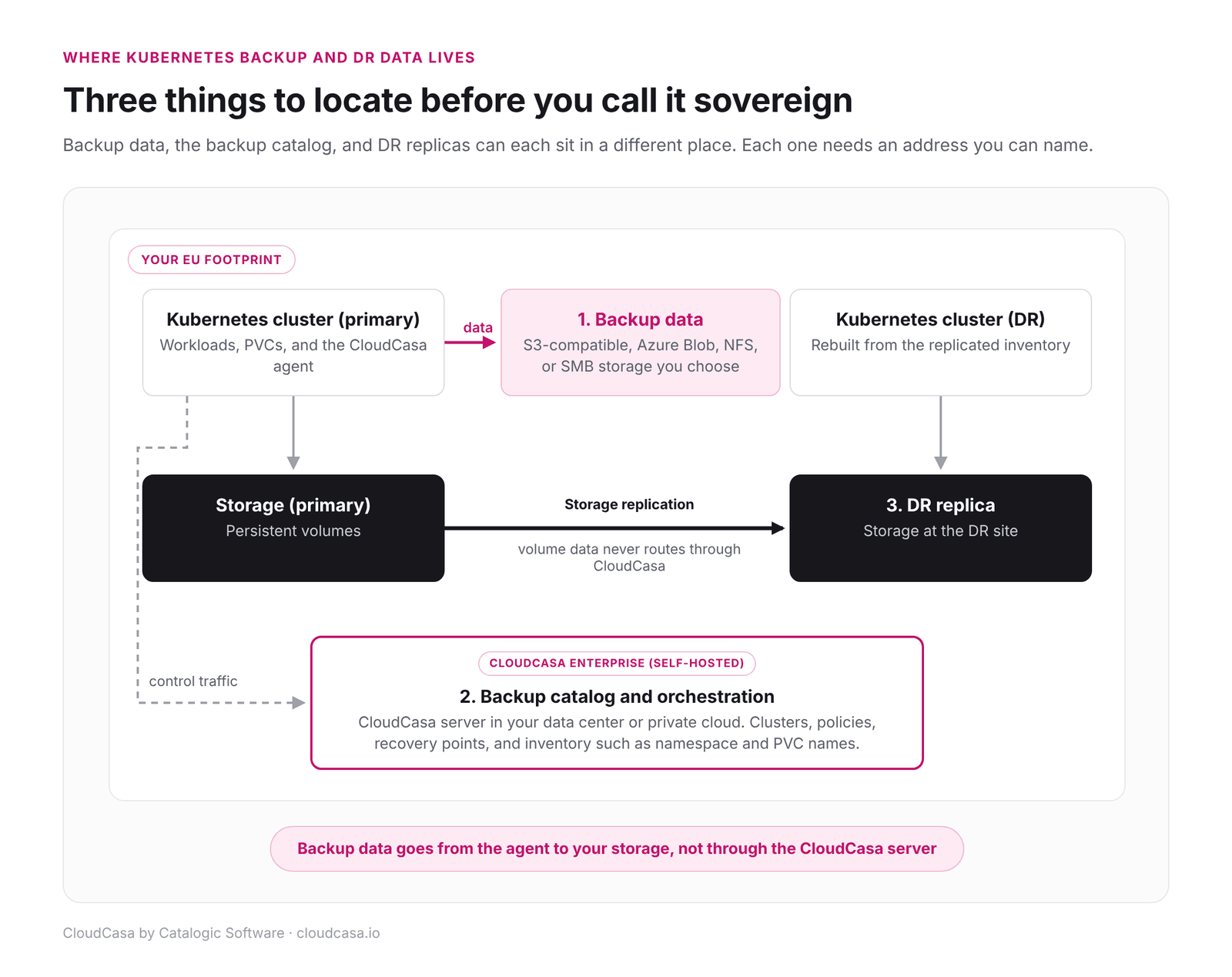
Backup data, the catalog, and DR replicas each have their own location.
1. Backup data
The CloudCasa agent in each cluster writes backup data directly to the storage you configure. It does not pass through the CloudCasa control plane. Supported targets include S3-compatible object storage, Azure Blob Storage, NFS, and SMB, so you can pick a provider and a region that meet your residency rules.
If jurisdiction matters as much as location, use object storage from a provider whose jurisdiction you have assessed, and keep the bucket in your own account.
For immutable copies, CloudCasa supports S3-compatible storage with Object Lock and Azure Blob immutable storage on customer-owned storage, available in paid plans.
2. The backup catalog
The catalog is the metadata that ties backups together. It holds clusters, backup definitions, cloud accounts, policies, recovery points, and cluster inventory such as namespace, StorageClass, and PVC names. Those names can be sensitive in their own right.
CloudCasa SaaS (Pro) runs its control plane, including the catalog, on AWS. For strict sovereignty requirements, run CloudCasa Enterprise (self-hosted). With CloudCasa Enterprise (self-hosted), the CloudCasa server runs in your own data center or private cloud, and the catalog stays in the cluster that runs the CloudCasa server. CloudCasa Enterprise (self-hosted) also supports on-premises and air-gapped deployments. For a fuller comparison, see SaaS vs. self-hosted Kubernetes backup: how to choose.
The CloudCasa Enterprise (self-hosted) catalog needs its own protection. CloudCasa backs it up to S3-compatible, Azure Blob, NFS, or SMB storage that you choose, which can also be kept in the EU.
3. DR replicas
CloudCasa DR for Storage uses replication on your storage arrays: HPE Alletra Storage 9000 and Alletra Storage MP B10000 with HPE Remote Copy, Dell PowerStore, and SUSE Storage (Longhorn). Your storage replicates the volume data, and it never routes through CloudCasa. HPE Alletra and Dell PowerStore replicate array to array. SUSE Storage (Longhorn) DR volumes are updated from a Longhorn backup target that both sites use (see the SUSE Storage documentation), so that target has to be in the EU as well. If both sites and every replication target are in the EU, the DR replica is too.
CloudCasa orchestrates the Kubernetes side of the failover from the same control plane as backup, so the catalog question above applies to DR as well. CloudCasa Enterprise (self-hosted) deployments can also run a CloudCasa server at each site, so DR recovery jobs can be run from the recovery site. For the array details, see CloudCasa and Dell PowerStore.
EU and national cloud providers
Want both the Kubernetes clusters and the backup storage with an EU provider? A few examples:
- OVHcloud. OVHcloud is listed among the hosted Kubernetes services verified with CloudCasa.
- IONOS. IONOS S3 Object Storage is verified as a CloudCasa backup target, and CloudCasa Enterprise (self-hosted) can be installed on IONOS Managed Kubernetes. See CloudCasa for IONOS Cloud.
- National providers such as Chmura Krajowa in Poland. CloudCasa supports CNCF-certified Kubernetes distributions and hosted services, so a national cloud’s CNCF-certified Kubernetes service can be evaluated with CloudCasa. Validate the exact Kubernetes service, the CSI snapshot setup, and Object Lock support on the storage before production use.
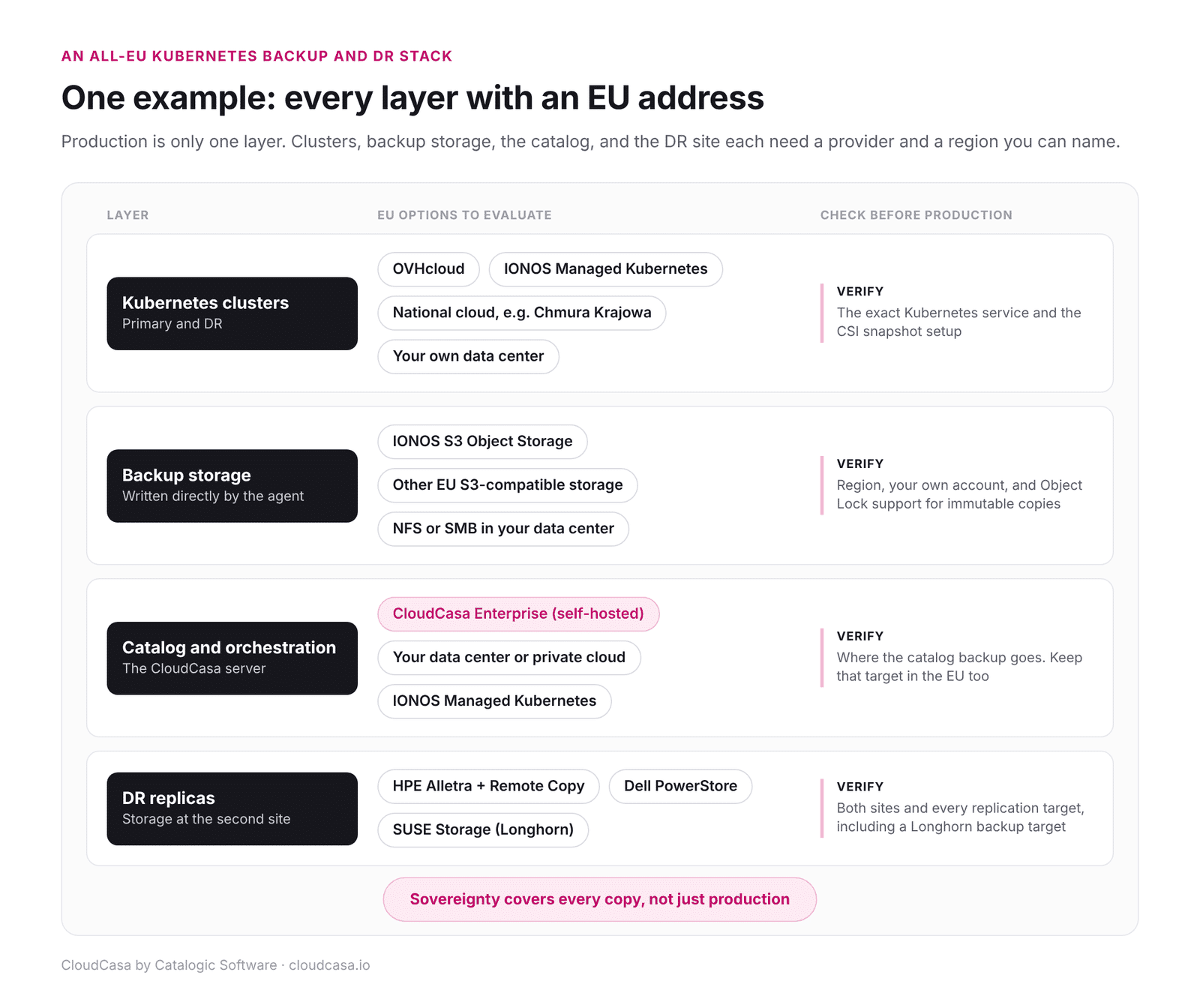
An all-EU example: each layer of the backup and DR stack, with what to check before production.
An implementation partner can map all of this before migration. Sorigo partners with OVHcloud, Chmura Krajowa, and Microsoft Azure, among others, and builds and migrates enterprise systems on public cloud platforms.
For data sovereignty projects, Sorigo maps where data resides and how it moves before migration begins, including production volumes, backup repositories, backup catalogs, and disaster recovery environments. The backup and recovery architecture is designed to operate within the same sovereignty boundaries as the production environment.
“Customers usually know where their production clusters are hosted. The more difficult question is where their data goes when it is backed up or replicated. We address this before the first workload is migrated, accounting for backups, backup catalogs, and disaster recovery environments, so that data remains within the required jurisdiction.”
Artur Ossowski
CEO, Sorigo
A sovereignty checklist for Kubernetes backup and DR
Before an auditor or a customer asks, can you answer these for every cluster?
- Where does each backup copy land? Name the provider, the region, and the account for every backup target, including any default storage.
- Can the agent reach only the endpoints you expect? The connection to your CloudCasa server carries the control channel only. The agent also needs network access to each backup storage endpoint, so list those endpoints and keep them inside the boundary.
- Which jurisdiction applies to the storage provider? Location and jurisdiction can differ for providers headquartered outside the EU.
- Where does the backup catalog run? With CloudCasa Enterprise (self-hosted), it runs in your own data center or private cloud. Keep its catalog backups inside the boundary as well.
- Are both DR sites inside the boundary? Check the replication target as carefully as the primary site.
- Are the copies immutable? Residency rules and ransomware protection apply to the same copies. Immutable storage you own, in an EU region, addresses both for that copy.
- Can you show it on paper? DORA expects the regions and countries in the contract. Your backup design should produce the same list.
- Have you restored inside the boundary? A restore test to an EU cluster from EU storage proves the setup works end to end.
For recovery after an attack, see Kubernetes Ransomware Recovery: Choosing Between DR Failover and Clean Restore.
The bottom line
Data sovereignty for Kubernetes covers every copy of the data. With CloudCasa Enterprise (self-hosted), backup data goes to storage you choose, DR replicas stay on your own storage, and the catalog runs in your own data center or private cloud. Keep every target in the EU.
Frequently asked questions
Can CloudCasa run entirely in my own data center?
Yes. CloudCasa Enterprise (self-hosted) runs in your own data center or private cloud, including on-premises and air-gapped deployments.
Does DR data pass through CloudCasa?
No. With CloudCasa DR for Storage, your storage replicates the volume data between sites. CloudCasa orchestrates the failover and rebuilds the Kubernetes side on the DR cluster.
Which EU providers can I use for backup storage?
Most S3-compatible object storage, including EU options such as IONOS S3 Object Storage, plus Azure Blob Storage, NFS, or SMB, as long as your clusters can reach it. Check that the provider supports Object Lock if you need immutable backups.
Planning sovereign Kubernetes backup and DR?
Talk to a CloudCasa specialist about where your clusters, backup storage, and DR sites run, and how CloudCasa Enterprise (self-hosted) fits your requirements.
Sources
- SaaS vs. self-hosted Kubernetes backup: how to choose
- CloudCasa Enterprise (self-hosted) catalog backup
- CloudCasa DR setup guide
- CloudCasa DR servers (self-hosted)
- CloudCasa Enterprise (self-hosted) on IONOS
- SUSE Storage disaster recovery volumes
- CloudCasa and Dell PowerStore DR
- GDPR Article 44
- EU General Court upholds EU-U.S. Data Privacy Framework (Jones Day)
- Latombe appeal, Case C-703/25 P (EUR-Lex)
- CLOUD Act, 18 U.S.C. § 2713
- DORA Article 30