Most OpenShift Virtualization projects start with a simple goal: move virtual machines off a traditional hypervisor and onto a Kubernetes-based platform without forcing every workload to be rewritten. That is a practical goal. Many organizations have VM estates that will not become containers any time soon, and OpenShift Virtualization gives infrastructure teams a way to run those VMs next to containerized applications on the same operational platform.
The mistake is assuming the migration is complete once the VM boots on OpenShift.
For many teams, data protection becomes a Phase 2 problem. First migrate the VM. First make the network work. First map storage. First prove performance. OpenShift Virtualization backup and disaster recovery are left for later because the team assumes the old model still applies, or that Kubernetes backup will cover everything by default.
That assumption is risky. OpenShift Virtualization changes the backup surface. A VM is still a VM to the application owner, but it is also a set of Kubernetes resources, persistent volumes, controller relationships, storage mappings, network attachments, and platform dependencies. If the backup plan only captures part of that model, the restore plan will fail at the exact moment it needs to work.
CloudCasa provides Kubernetes and VM backup for Red Hat OpenShift, including OpenShift Virtualization environments, and is designed to protect Kubernetes resources, persistent data, and VM workloads together.

The VM is no longer just a VM
On vSphere, many infrastructure teams were used to protecting a VM as a relatively self-contained object. The backup product talked to vCenter or ESXi, captured the VM configuration, read changed blocks from virtual disks, used VMware Tools for quiescing, and restored the VM back to a host, cluster, datastore, or recovery site.
OpenShift Virtualization is different. It is based on KubeVirt, which expresses VMs through Kubernetes custom resources. The VM disk is usually backed by a PersistentVolumeClaim. The VM definition lives in the Kubernetes API. The runtime is scheduled as a pod. The VM may depend on DataVolumes, CDI behavior, storage classes, multus network attachments, secrets, cloud-init data, service accounts, RBAC, and namespace-level policy.
That means there are two backup questions, not one.
The first question is: did you capture the VM’s data? That means the guest disks, usually through CSI-backed snapshots, data movement, replication, or another storage-integrated mechanism.
The second question is: did you capture the Kubernetes definition of the VM and everything needed to run it again? That means the VirtualMachine resources, DataVolumes, PVC definitions, relevant namespace objects, storage mappings, network objects, and the surrounding cluster state.
Capturing only the KubeVirt CRs is not enough. You may be able to recreate a VM definition that points to data you no longer have. Capturing only the disk is not enough either. You may have a recoverable volume with no reliable way to reconstruct how that VM was supposed to attach, boot, authenticate, and connect to the network.
A credible OpenShift Virtualization backup plan must protect both. CloudCasa’s KubeVirt VM backup and restore documentation covers backup, restore, migration, VM selection, PVC handling, and restore considerations for KubeVirt-based platforms including Red Hat OpenShift Virtualization.
Crash-consistent is not the same as application-consistent
A storage snapshot of a running VM can be useful, but it does not automatically mean the application inside the guest is in a clean state. Infrastructure teams learned this years ago with vSphere. The same principle applies here.
For OpenShift Virtualization, application consistency depends on what happens inside the guest before the snapshot or backup begins. Red Hat documents that the QEMU Guest Agent can help create higher-integrity online VM snapshots by freezing and thawing the guest filesystem. KubeVirt also documents how the guest agent exposes runtime guest information through the VM status.
Without that guest-level participation, the result is typically crash-consistent. That may be acceptable for some workloads. It is not acceptable for every workload. A stateless utility VM and a database VM do not have the same consistency requirement.
Infrastructure leads should make this explicit in the migration plan. For each VM tier, define whether crash-consistent backup is acceptable, whether guest agent quiescing is required, and whether application-specific pre-freeze and post-thaw scripts must be configured. Then test the restore. A backup job that completes successfully is not proof that SQL Server, PostgreSQL, Active Directory, or a line-of-business application will recover cleanly.
CloudCasa supports application-consistent protection as part of its Kubernetes backup and restore solution, including protection of Kubernetes resources and persistent data across clusters and environments.
Restoring into another cluster is the real test
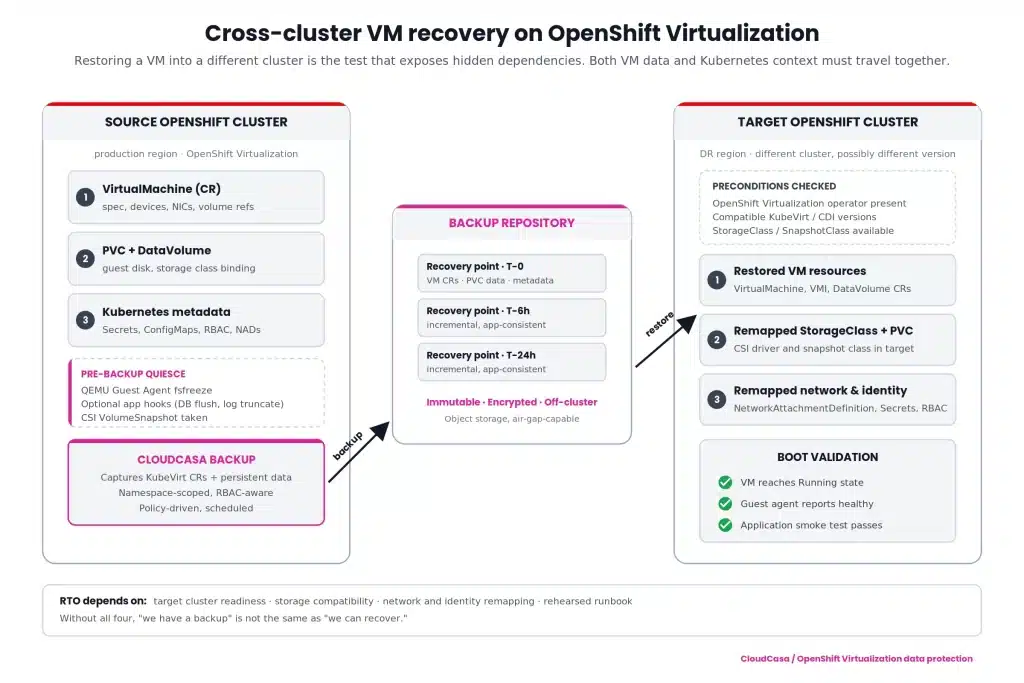
Restoring a VM back into the same namespace on the same cluster is useful, but it is not the scenario that exposes most design flaws. The harder and more important test is restoring a VM into a different OpenShift cluster.
That is where hidden dependencies appear.
Does the target cluster have the same OpenShift Virtualization version or a compatible one? Are the required CRDs and operators installed? Do the StorageClasses exist, and do they map to the right storage backend? Can the restored PVCs bind? Are network attachment definitions present? Are MAC addresses, DNS names, IP assumptions, certificates, routes, and firewall policies still valid? Are secrets restored safely, or do they need to be remapped? Does the VM need to start in a specific order relative to other VMs or services?
This is where traditional “I have the disk” thinking breaks down. For cross-cluster recovery, the restore workflow must understand Kubernetes resources and VM data together. The target state is not simply a VMDK on another datastore. It is a functioning VM workload inside a different Kubernetes control plane.
CloudCasa is designed for this Kubernetes-aware recovery model: protecting applications, persistent volumes, Kubernetes resources, and VM workloads, then recovering them across clusters where the business requires it. For OpenShift Virtualization, that means the recovery plan should include both the VM-level data and the Kubernetes objects needed to make the VM usable after restore.
CloudCasa’s broader Kubernetes backup platform supports Kubernetes-native protection, unified Kubernetes and VM protection, immutable backups, and multi-cluster policies. For self-managed or regulated environments, CloudCasa Self-Hosted gives organizations more control over deployment location, storage, network isolation, and compliance boundaries.
RTO expectations should not quietly get worse
Many migration teams are under pressure to match the operational expectations they had on vSphere. That includes recovery time objectives.
On vSphere, infrastructure teams often expected image-level restore, changed-block based backup, application quiescing, file-level recovery, alternate-host restore, and predictable runbooks. Moving to OpenShift Virtualization should not mean quietly accepting worse recovery behavior because the platform changed.
The correct approach is to tier the VM estate before migration.
Tier 0 and Tier 1 VMs need explicit RPO and RTO targets. They may require frequent backups, storage replication, pre-staged recovery clusters, dependency-aware recovery plans, and regular failover testing. Tier 2 workloads may be fine with scheduled backup and restore. Test and development VMs may only need basic protection or short retention.
For infrastructure leads, the practical question is not “Can we do OpenShift Virtualization backup?” The question is “Can we recover the right VM, to the right cluster, with the right data point, inside the same business window we had before?”
If the old expectation was one to four hours for important VMs, design and test against that. Do not discover after migration that a restore requires manual reconstruction of YAML, storage mappings, and network definitions before the VM can even boot.
CloudCasa’s pricing page highlights advanced restore options, cross-cluster restores, file-level restores from PVCs and KubeVirt VMs, migration, replication, RBAC, and API/CLI automation for higher-tier use cases.
Why legacy VMware backup tools do not solve this cleanly
Legacy VMware backup tools were built around VMware inventory, VMware APIs, VMware snapshots, Changed Block Tracking, VMware Tools, datastores, and vCenter permissions. Those assumptions do not hold once the VM runs on OpenShift Virtualization.
The first problem is inventory. The source of truth is no longer vCenter. VM identity and configuration live in Kubernetes resources. A backup tool that cannot understand those resources cannot fully protect or restore the workload.
The second problem is storage. VM disks are not simply VMDKs on VMFS or NFS datastores. They are persistent volumes managed through Kubernetes and CSI. Snapshot behavior, data movement, and restore behavior depend on the storage class, CSI driver, and platform configuration.
The third problem is consistency. VMware Tools workflows do not map directly to OpenShift Virtualization. Guest consistency depends on QEMU Guest Agent behavior and, where needed, guest-side hooks or application-aware coordination.
The fourth problem is recovery location. A VMware backup product may be good at restoring to a vSphere cluster. That does not mean it can restore an OpenShift Virtualization VM into another OpenShift cluster with the right CRs, PVCs, network objects, secrets, and storage mappings.
The fifth problem is operational ownership. OpenShift Virtualization sits inside the Kubernetes platform. Platform teams expect namespace scoping, RBAC, policy-based protection, API-driven automation, and integration with cluster operations. A hypervisor-centric backup tool usually sees only part of that world.
This does not make the old tools bad. It makes them the wrong control point for this platform.
What to put in the migration checklist
Before moving production VMs to OpenShift Virtualization, infrastructure leads should require a data protection design that answers these questions.
- Which VMs are protected at the VM level, and which Kubernetes resources are included with them?
- Which workloads require application-consistent quiescing, and is QEMU Guest Agent installed, running, and tested?
- Can the team restore a VM into a different OpenShift cluster without manually rebuilding the environment?
- Are StorageClasses, network attachments, secrets, and namespace policies included or mapped during recovery?
- What RPO and RTO target applies to each VM tier?
- Can individual files be recovered when full VM restore is unnecessary? CloudCasa’s file-level recovery for Kubernetes VMs addresses this common operational need.
- Is there a tested runbook for failover, restore validation, and failback?
- Is the backup platform deployable in the required operating model, including self-hosted, air-gapped, or data-sovereign environments where needed?
These questions belong in Phase 1. They are not cleanup items.
The bottom line
OpenShift Virtualization is a strong path for teams that need to modernize virtualization without rewriting every application. It also changes the data protection architecture. A VM on OpenShift is part guest workload, part Kubernetes application, and part persistent storage object. Protecting only one layer creates a restore gap.
CloudCasa helps close that gap by treating OpenShift Virtualization backup as a Kubernetes-native problem: VM data, persistent volumes, application resources, cluster context, and cross-cluster recovery belong in the same protection model.
If you are scoping a migration from vSphere or another hypervisor to OpenShift Virtualization, do not wait until after the cutover to ask what backs up the VMs. By then, the risk has already moved with them. For a practical next step, review CloudCasa’s OpenShift backup, migration, and DR capabilities or the CloudCasa guide for backup and restore of VMs on Kubernetes.