Building resilient infrastructure is a must for modern organizations operating across hybrid environments. As applications move between on-premises and the cloud, ensuring data protection and continuity becomes a key priority.
Red Hat OpenShift offers a consistent platform for running containerized and virtualized workloads across hybrid environments. Combined with CloudCasa by Catalogic and Amazon Web Services (AWS), it provides a complete, enterprise-grade disaster recovery (DR) solution that helps organizations protect, move, and restore their workloads with ease.
This article explains how ROSA (Red Hat OpenShift Service on AWS) and CloudCasa work together to simplify hybrid workload protection and recovery, along with practical steps to implement a robust DR strategy across OpenShift environments.
Understanding the Challenge: Modern Hybrid Infrastructure
Most enterprises today operate a mix of containers and virtual machines (VMs) across multiple environments. They rely on Red Hat OpenShift and OpenShift Virtualization to manage these workloads both in on-premises data centers and on AWS.
While this hybrid model offers flexibility, it also introduces complexity when ensuring data consistency, recovery speed, and business continuity. To meet enterprise demands, DR solutions must address four essential requirements:
- Native OpenShift Integration: Deep understanding of OpenShift APIs and Virtualization for seamless protection and recovery.
- Unified Protection: Centralized management for both containers and VMs from one interface.
- Offsite Backup: Secure, encrypted storage with cloud services like Amazon S3 and Amazon S3 Glacier for long-term retention.
- Flexible Recovery Options: Rapid restore to on-premises or cloud targets while meeting strict RTO and RPO objectives.
Legacy backup tools often struggle with hybrid workloads, leading to manual scripting and fragmented recovery workflows. Cloud-native environments require purpose-built solutions that deliver simplicity, automation, and reliability — without compromising control.
CloudCasa: Native Backup Solution for OpenShift
CloudCasa by Catalogic provides a Kubernetes-native backup and recovery platform designed to protect Red Hat OpenShift environments, including support for OpenShift Virtualization.
Key Capabilities
- Comprehensive Cluster Protection: Safeguard OpenShift clusters, Kubernetes resources, persistent volumes, and virtual machines.
- Flexible Storage Options: Use CloudCasa’s managed storage or your own object storage — all fully encrypted in transit and at rest.
- Simplified Management: Configure backup policies and schedules through an intuitive SaaS interface, minimizing administrative effort.
- Granular Recovery Control: Restore entire clusters, namespaces, or specific VMs to previous points in time to meet RTO/RPO objectives.
- Broad Cloud Integration: Extend protection to cloud services such as Amazon RDS, EFS, and EBS, all within a single console.
These features make CloudCasa an ideal solution for platform teams seeking enterprise-level protection for OpenShift workloads — without adding operational complexity.
ROSA: Managed OpenShift on AWS
ROSA brings together Red Hat OpenShift’s enterprise capabilities and the reliability of AWS to offer a fully managed OpenShift environment optimized for production workloads.
Key Advantages
- Fast Deployment: Launch production-ready OpenShift clusters on AWS quickly to minimize downtime during recovery.
- Native AWS Integration: Seamless use of core AWS services including Amazon EC2, Amazon S3, AWS IAM, and CloudWatch.
- Operational Consistency: Maintain the same OpenShift workflows and tools across on-premises and cloud environments.
- Comprehensive VM Support: Restore both containerized applications and VMs on AWS bare metal instances with OpenShift Virtualization.
- Automation with Ansible Automation Platform (AAP): Simplify provisioning and day-two operations through event-driven automation across OpenShift and AWS.
Together, these capabilities enable hybrid resiliency and seamless movement of workloads between environments, ensuring predictable and efficient recovery when needed.
CloudCasa + ROSA: Enterprise-Grade Recovery Solution on AWS
A strong disaster recovery plan requires more than just reliable backups — it needs fast, flexible recovery. CloudCasa makes it easy to restore data and workloads to any compatible environment, while ROSA provides the ideal recovery destination thanks to its managed, scalable architecture on AWS.
CloudCasa supports restoration to a different cluster, namespace, or even performs deduplication on persistent volume data. In the event of a full cluster loss, workloads can be restored to a newly created ROSA cluster. Once provisioned, simply deploy the CloudCasa agent YAML and start the recovery process.
Figure 1: CloudCasa backup and recovery flow

How to Implement Disaster Recovery with CloudCasa and ROSA
This implementation guide explains how to configure disaster recovery for OpenShift workloads using CloudCasa and Red Hat OpenShift Service on AWS (ROSA).
Prerequisites
- An active CloudCasa account
- An AWS account with administrative permissions
- A ROSA cluster with cluster-admin access (AWS infrastructure costs may apply)
Step 1: Configure On-Premises OpenShift Backup
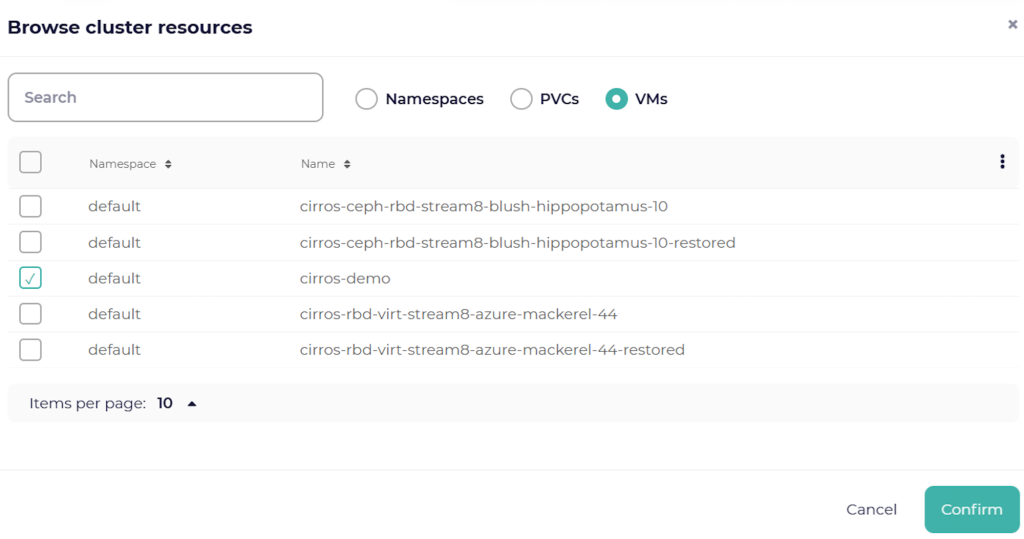
Log in to the CloudCasa console and select the OpenShift resources you want to protect, such as namespaces, persistent volumes, or virtual machines.
CloudCasa automatically detects virtual machines running on OpenShift Virtualization. You can choose to back up the entire cluster or only specific workloads. All related Kubernetes configuration data is included automatically.
Figure 2: CloudCasa console displaying OpenShift cluster resources
Step 2: Manage a Disaster Recovery Scenario
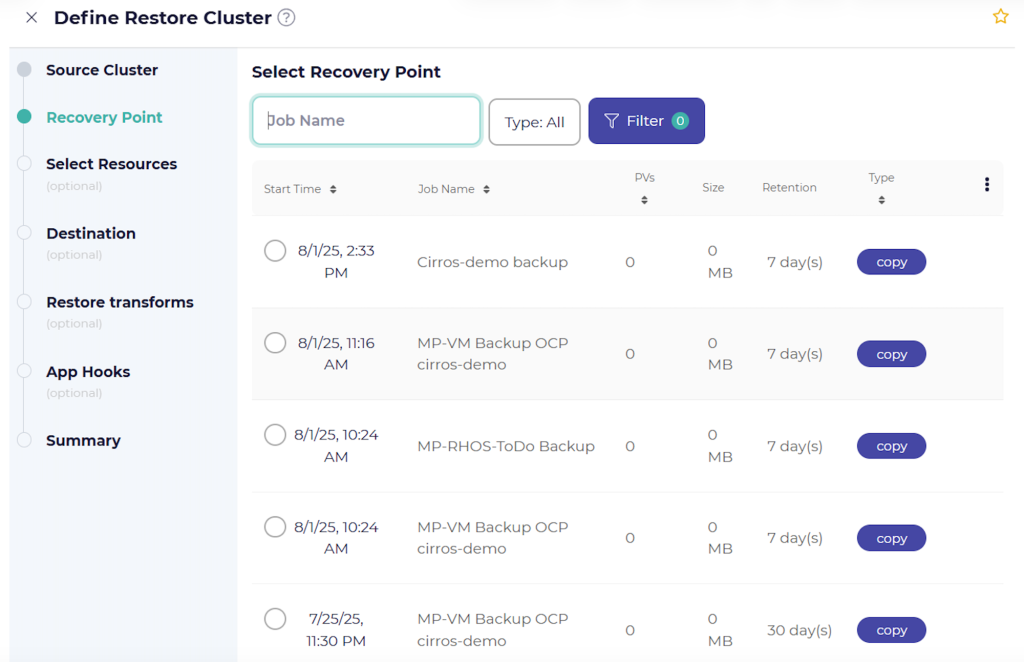
If the on-premises OpenShift environment becomes unavailable or data is lost, recovery can be initiated directly from the Cluster Restores section in the CloudCasa console.
CloudCasa maintains a complete catalog of recovery points, allowing administrators to quickly restore workloads from snapshots stored locally or in offsite object storage.
Figure 3: CloudCasa recovery point (snapshot) list
- Prepare the ROSA Cluster: For faster recovery, maintain an always-available ROSA cluster. Alternatively, quickly deploy a new ROSA cluster—including OpenShift Virtualization on AWS bare metal—using Ansible Automation Platform or similar automation tools.
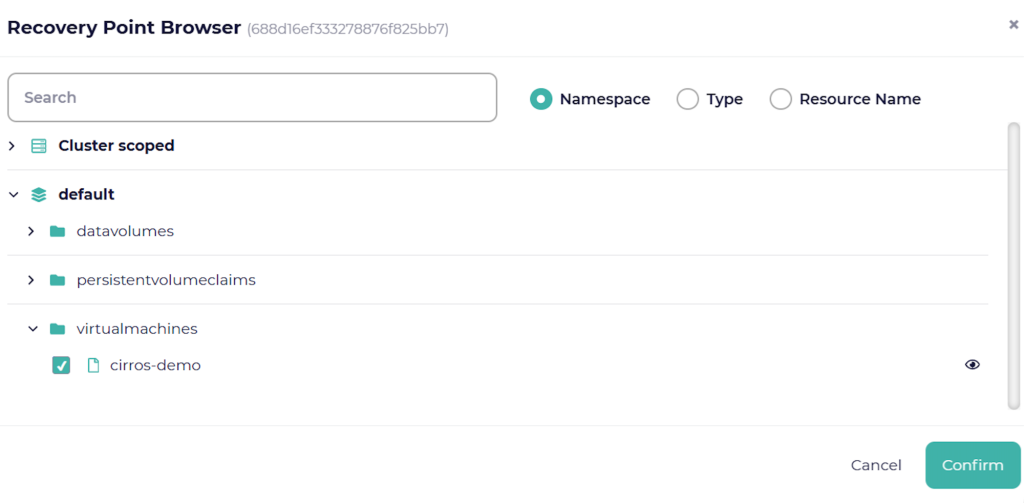
- Restore Workloads: From the CloudCasa console, use the Recovery Point Browser to restore specific workloads, virtual machines, or individual files from persistent volumes.
Figure 4: CloudCasa view of the Recovery Point Browser
Step 3: Validate and Clean Up
After restoring workloads, verify that applications are functioning correctly in the ROSA recovery environment.
Once validation is complete, perform the following cleanup steps:
- Delete the temporary ROSA cluster: Remove the recovery cluster to avoid unnecessary AWS infrastructure costs.
- Clean up unused backups: Remove outdated or unneeded backups from CloudCasa to keep the environment organized.
Summary
The combination of CloudCasa, ROSA, and AWS provides a simple and powerful approach to protecting hybrid OpenShift environments. Together, they deliver consistent backup and recovery for both containers and virtual machines while reducing operational complexity.
By leveraging CloudCasa’s Kubernetes-native protection and ROSA’s managed OpenShift service, organizations can achieve:
- Unified protection for hybrid and multi-cloud workloads
- Simplified management through automation and centralized control
- Rapid recovery with predictable RTO and RPO outcomes
- Consistent workflows across on-premises and cloud environments
Ready to simplify disaster recovery for Red Hat OpenShift? Get started with CloudCasa today.